
How to play Spellosion
Spellosion is a free word game for two players, or for one player against the computer. You build words on a shared board, guess a secret four-letter word, and set off explosions that steal squares.
Jump to: Watch Lex · Goal · Starting · Daily Game · Build words · Secret word · Explosions · Ending · Online · Tips · FAQ
Watch Lex explain it in 90 seconds
Lex, the Spellosion bot, shows you how to play. The captions are built into the video, so the sound is optional.
Read the transcript
The hook. Hi, I’m Lex! Welcome to Spellosion. I’m kind of the one in charge around here. Wait… you don’t know what Spellosion is? It’s only the greatest game on the planet! Let me show you how to play before I completely destroy you. I’ve read every dictionary ever written. Every. Single. One. So trust me, you’ve got absolutely no chance of beating me. …But hey, good luck! You’re going to need it.
The goal. Here’s the goal: find the secret four-letter word. Get it first and you win on the spot.
Step 1: build words. Step one: build words! Drag letters onto the board, or just tap them. Start on the star. Longer words score more!
Step 2: find the secret word. Step two: play a four-letter word and your tiles light up with clues. Green means right spot. Yellow means wrong spot. Gray means not in the word.
Lightning-bolt guesses. Every green tile earns a ⚡. So does every 45 points. Spend one to guess the secret word. Get it right, you win!
Step 3: explosions. Step three: explosions! Play next to your tiles to charge them. When a square fills up… BOOM! It steals the squares around it. Even mine. Rude.
How to win. No more moves? Game over. Most points wins. Every square you own is a point.
Play. Play me, a friend, or the Daily Game. Free at Spellosion.com. I’ll be waiting. Confidently.
Prefer to read? The full rules are right below.
The goal
Build words to score more points than your opponent, and be the first to guess the secret four-letter word! It can be any common, everyday four-letter word. Guess it right and you win on the spot. If nobody does, the game ends as soon as a player has no legal word to play on their turn, and the higher total wins. Your total is your word points plus 1 point for every square you own.
Starting a game
- Pick a theme. The secret word comes from the theme you choose: Classic (any common four-letter word), Grocery List, Animals, Sports, Outer Space, Movies, Music, Cartoons or Retro. There is also one seasonal theme that changes through the year: Halloween in October, Thanksgiving in November, Christmas from December 1 to 25, New Year's from December 26 to January 1, and Mystery (detective and whodunit words) the rest of the year.
- Then choose how to play: Play the Computer (Easy, Normal or Hard), Play a Friend Online, or Pass & Play, where two people share one phone or computer and take turns.
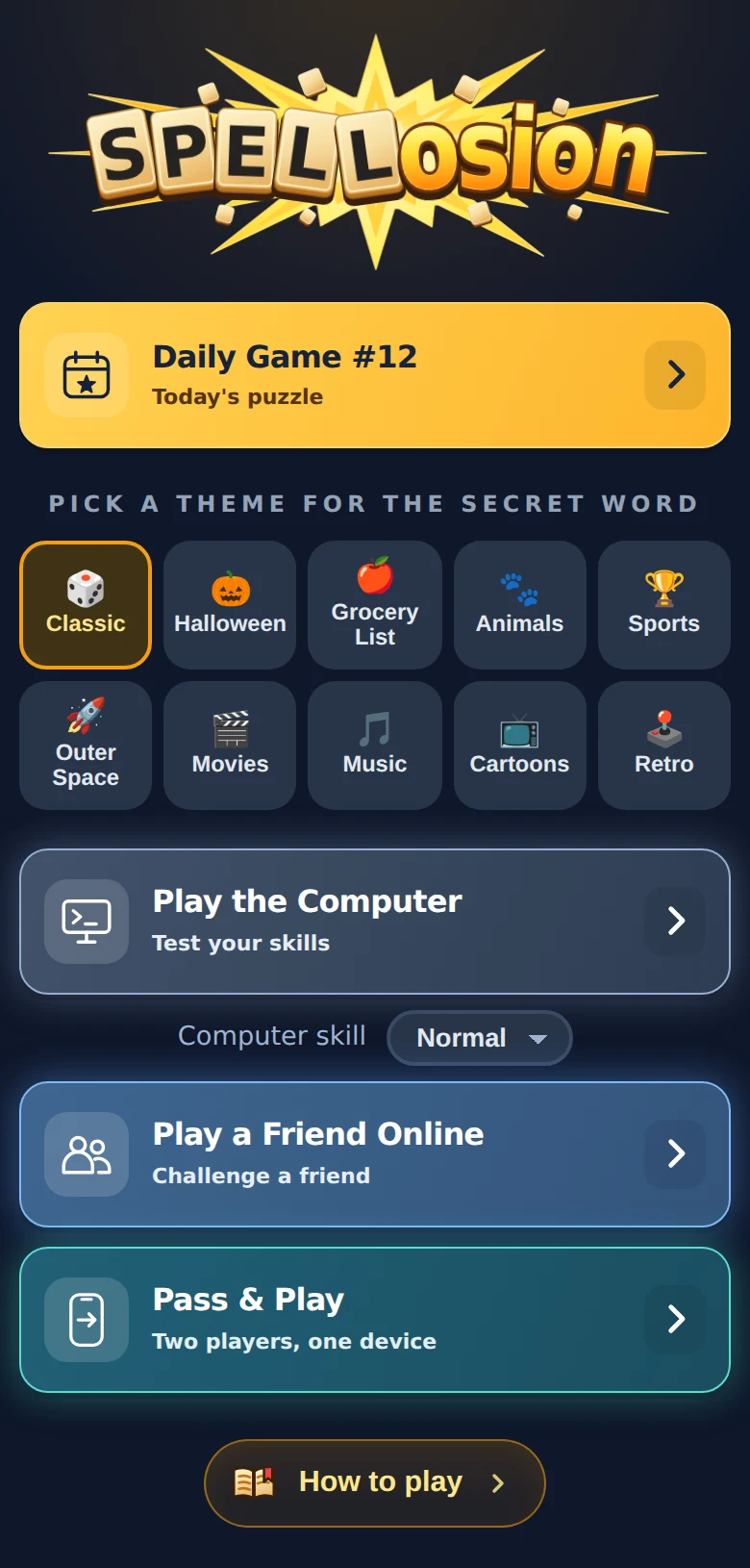
Daily Game
Play one game each day against the computer (Normal level). Everybody gets the same secret word and the same starting tiles. Tap the gold Daily Game card at the top of the start screen.
- One game a day. You can leave and come back, and your game will be waiting where you left it. If you do not finish before the next Daily Game arrives, it counts as a loss.
- A new game every day at midnight. Each one has a number, like Daily Game #12.
- Share your score. When you finish, tap Share result to show friends how you did. It never gives away the secret word.
- Keep a streak. Your streak is how many days in a row you have played. You can also see how many games you have played and won.
- Your results stay on your device, so they will not follow you to a different phone or browser.
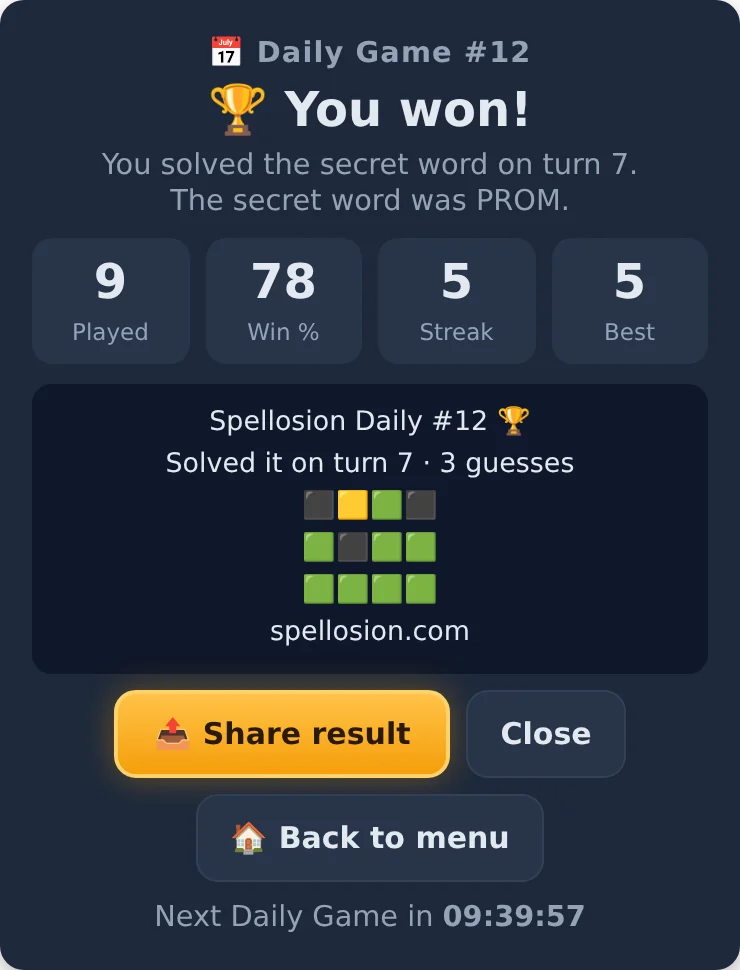
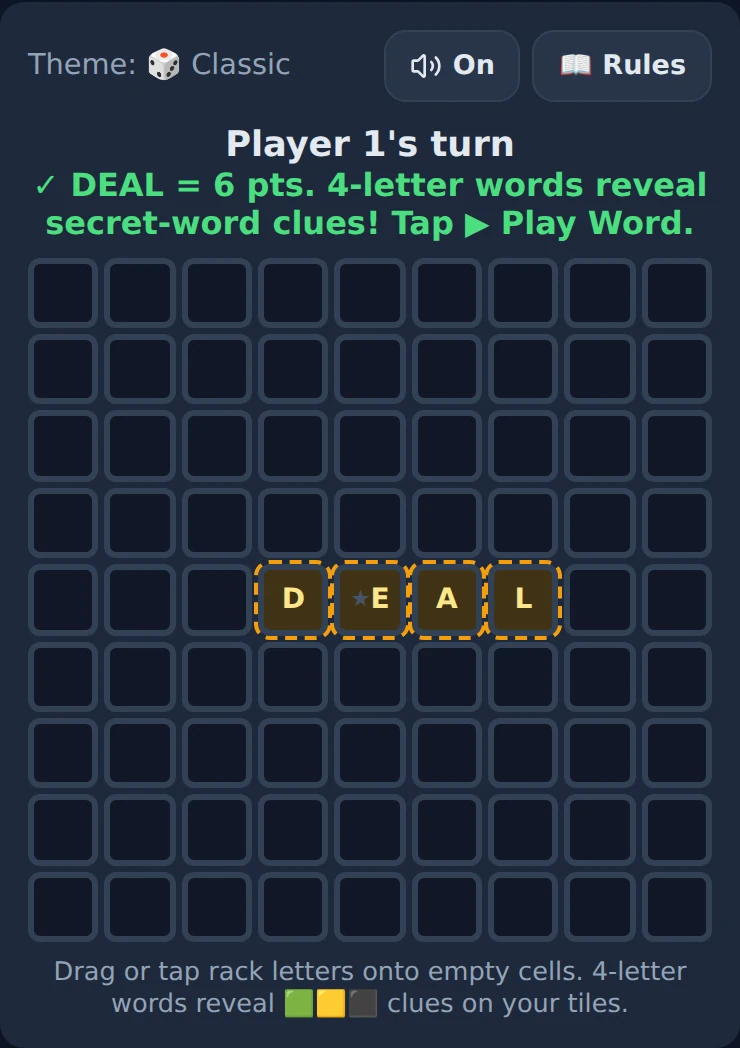
1. Build words
- Drag a letter from your rack (the row of seven tiles below the board) onto an empty square, or tap the letter and then tap the square. Place your tiles in one row or one column, then tap Play Word. Changed your mind? Drag a gold tile to another square, drag it back to your rack, or tap it to take it back.
- Your first word must cover the ★ in the center. After that, every new word must connect to tiles already on the board.
- Every word you make has to be a real word, including any short words your tiles form next to other tiles. The game checks them against its built-in dictionary of more than 110,000 words, and shows your score as you place your tiles.
- Scoring: every tile has a point value. Common letters are worth 1, harder letters are worth more, and Q and Z are worth 10. A word with five or more letters earns +5 bonus points, and using all seven of your tiles in one turn earns +20.
- Your rack always has a good mix of vowels and consonants.
2. Find the secret word
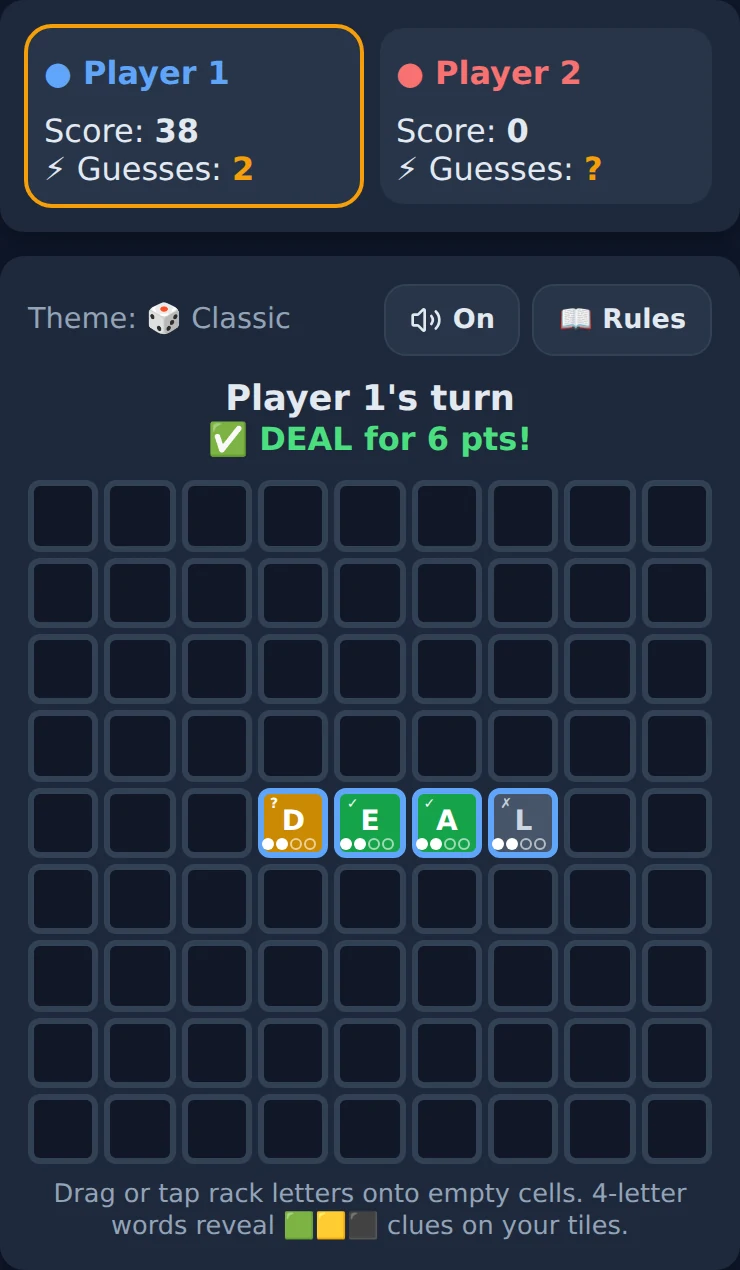
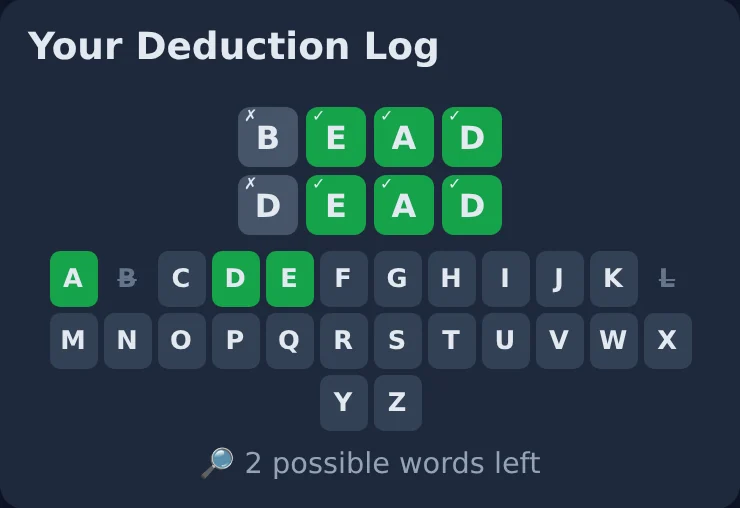
You and your opponent are both trying to find the same hidden four-letter word. Whenever you play a four-letter word on the board, its tiles light up with clues that only you can see:
- Green means the letter is in the secret word, and in the right spot.
- Yellow means the letter is in the secret word, but in a different spot.
- Gray means the letter is not in the secret word.
- Keep track. The A to Z letters show what you have learned. The "possible words left" counter only counts words from the theme's list, so it shows how many of those words could still be the secret word.
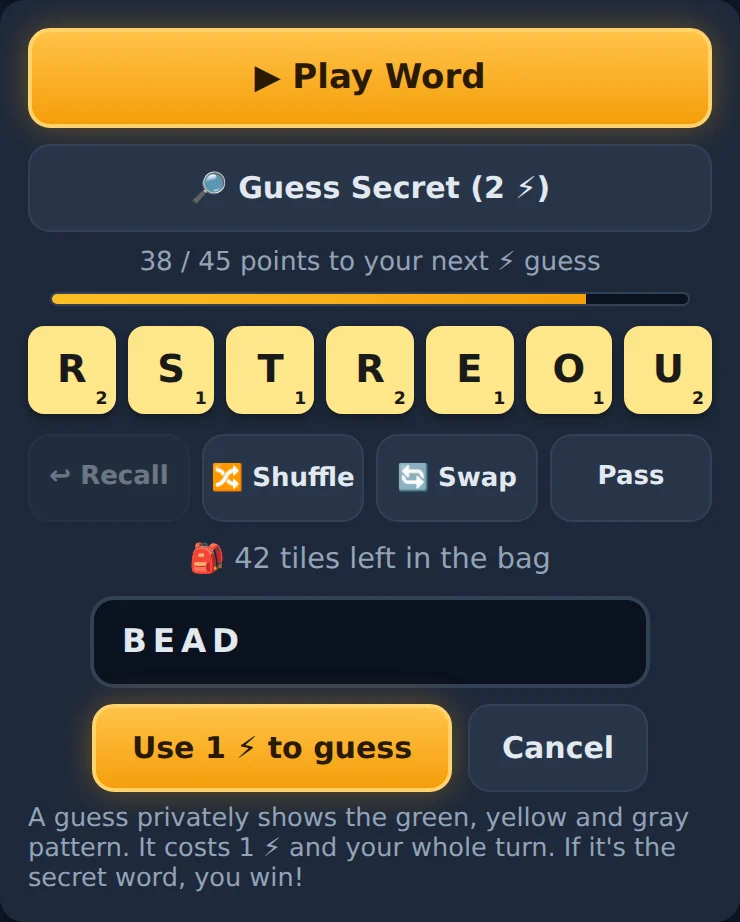
- Earn ⚡ guesses. Every green tile earns you one ⚡ guess, and so does every 45 points you score with words (up to 3 per game from points). A little meter by the Guess Secret button shows how close you are to the next one. Only you can see how many you have. With sound on, you also hear a short chime whenever a word or guess shows you a green letter.
- Guess the secret word. Tap Guess Secret and spend one ⚡ to type in any four-letter word. You see its green, yellow and gray colors in private. A guess takes your whole turn, and if it is the secret word, you win on the spot. If nobody finds the word, it is revealed when the game ends.

3. Explosions
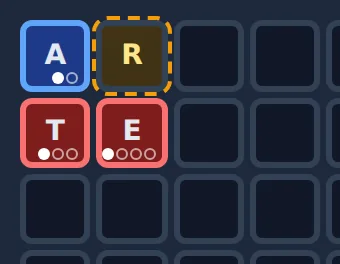
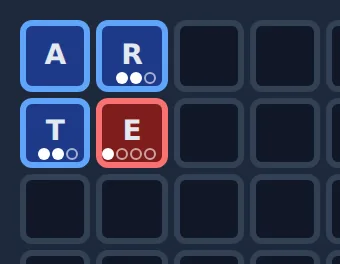
Think of every square on the board as a little cup with slots for orbs. The dots on a square show its slots: ● is an orb and ○ is an empty slot. Corner squares have 2 slots, edge squares have 3, and middle squares have 4.
The big rule: when every slot in a square is full, the square explodes! It gives 1 orb to each square touching it and turns those squares your color, even your opponent's. Those squares can fill up and explode too, which is how one explosion sets off the next.
How do orbs get in? Just by playing words:
- Each new tile you place gets 1 orb.
- Each square you own that touches your new tiles gets 1 more orb. This happens once per turn, and tiles in the same word that touch each other count too.
So building next to your own tiles charges them up. At the end of the game, every square you own is worth 1 point.
Stuck? Ending the game
- Swap trades in all your tiles for new ones and ends your turn. You get 3 swaps per game.
- Pass skips your turn. Four passes in a row end the game.
- The game uses 60 tiles in all. It also ends when someone solves the secret word, or when the player whose turn it is has no legal word to play (for example, when a player runs out of tiles). If it is your turn and you have no legal word to play, the game ends right there and the totals decide.
- When a game ends, tap Share result to copy a spoiler-free picture of the final board (🟦 and 🟥 show who owns each square) to post or send to a friend.
Playing online
Tap Play a Friend Online, then Create a game. Send your friend the invite link or the five-letter code, and you are ready to play. If your connection drops, the game tries to reconnect by itself. Your game and your clue colors are also saved, so you can switch to another app or refresh the page and keep going: the game reconnects by itself, or tap Resume (or type the same code) to rejoin. When a game ends, tap Rematch to play your friend again in the same room; the player who goes first alternates. If it will not connect, try putting both players on the same Wi-Fi, or tap Connect manually.
Tips
- Play four-letter words early. Each one gives you free clues about the secret word.
- Save your ⚡ guesses for when the counter stops going down.
- Long words score more points, and every 45 points earns a ⚡ guess. You can score your way to a guess without a single green tile.
- Watch the counter. Every guess costs a ⚡ and your whole turn, so wait until it is down to a few words before you guess.
- Corner squares explode easily because they only have two slots.
- Use your swaps wisely: you only get three.
- Words that cross tiles already on the board score extra, because every word you make counts.
Questions
Is it free? Yes. There are no accounts and nothing to buy.
Does it work on phones? Yes. It works on phones, tablets and computers.
Can I drag the tiles? Yes. Drag a letter from your rack onto an empty square, or tap the letter and then tap the square, whichever you prefer. You can also drag a gold tile to move it, drag it back to your rack, or drag your rack letters into a new order. On a phone, drag near the top or bottom of the screen and the page scrolls for you.
Can I play the Daily Game again? There is one Daily Game each day, but you can play the other game modes as often as you like.
Why was my word not accepted? It is not in the game's built-in dictionary.
I am colorblind. Can I change the colors? Yes. Tap the Colorblind colors link at the bottom of any page. Green and yellow change to orange and blue everywhere, and the tiles also show ✓, ? and ✗ marks.
Can I turn the sound off? Yes. Tap the speaker button next to Rules at the top of the game board. It controls the tile clacks, the green-letter chime, the ⚡ zap, the explosion sounds, the win and lose music and, on phones that support it, the buzz. Your choice is remembered.